Choose your two stars
Add a photo of one dog or cat, then a separate photo of one adult. Preview both for free and check that the faces are clear.
THE PET COMEDY COLLECTION
Upload a pet photo and your photo to make a five-second wake-up video. Your dog or cat kicks open the bedroom door, arrives with a boombox and interrupts your sleep. Preview both photos for free, then generate a 768p vertical MP4 for 10 credits. Download the finished clip privately and share your own morning chaos. The scene is fictional; AI likeness and motion can vary.
No automatic generation after login or checkout.
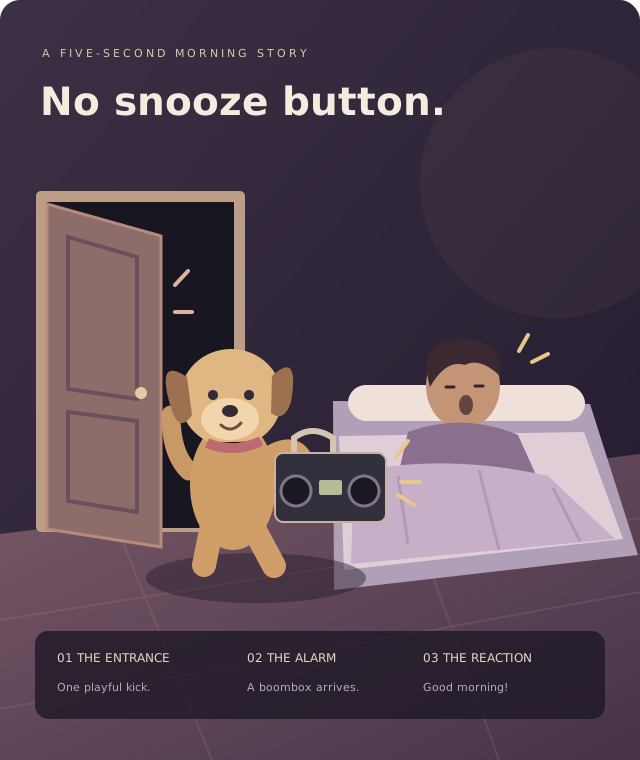
A sleepy bedroom, a very determined pet and one startled reaction. This template puts your two subjects into a single continuous scene, with the boombox as the punchline.
Requested output: 5 seconds · 768p · 9:16 · MP4 · 10 credits. Original alarm sounds are requested; no commercial song is supplied.
TWO PHOTOS. ONE VERY LOUD MORNING.
Add a photo of one dog or cat, then a separate photo of one adult. Preview both for free and check that the faces are clear.
Sign in, confirm permission and press Generate. One five-second, 768p vertical video uses 10 credits. Buying credits does not start it.
When the video is ready, download the private MP4 here or in My creations. Review it, then upload it to TikTok with any required AI-content label.
GIVE THE SCENE A GOOD START
KNOW BEFORE YOU GENERATE
Photo selection and the two local previews are free. They help you check the inputs; they do not show a finished animation. Creating a video uses 10 credits. A confirmed generation failure returns those credits, while cash refunds follow the refund policy.
ONE-TIME CREDIT PACKS
10 credits = 1 Pet Wake Up Call video
5 seconds · 768p · 9:16 vertical MP4. Pay once and use your credits at any time.
$9.99USD
10 credits
Enough for 1 Pet Wake Up Call video
Pay once. No expiration.
Secure checkout with PayPal
Start with a small pack.
$24.99USD
30 credits
Enough for 3 Pet Wake Up Call videos
Pay once. No expiration.
Secure checkout with PayPal
Save $4.98 compared with 3 Single packs.
$69.99USD
100 credits
Enough for 10 Pet Wake Up Call videos
Pay once. No expiration.
Secure checkout with PayPal
Save $29.91 compared with 10 Single packs.
Packs add to your credit balance. If a generation fails, the charged credits return to your balance. Cash refunds are handled separately under the refund policy. Terms · Refund Policy · Support
MADE FOR YOUR NEXT POST
The result panel gives you a private MP4 download and a copy-hashtags button. Upload the downloaded file to TikTok, Instagram Reels or your editor. Use the platform’s AI label where required and choose a soundtrack you may use.
Suggested caption: “I asked for a wake-up call. My pet took it personally.” Sharing is your choice; we do not post to your accounts.
A FEW THINGS TO KNOW
It is a short fictional scene starring your pet and an adult from two photos. The pet opens the bedroom door with a playful kick, enters with a boombox and startles the sleeping person awake. This template creates a five-second vertical clip.
Put one clear dog or cat photo in the pet slot and one photo of an adult in the person slot. Use separate photos with one subject in each. Show the pet’s face, markings and body, and keep the person’s face unobstructed. JPG, PNG and WebP are supported, up to 2 MB per photo and at least 256 × 256 pixels.
You can select both photos and preview them in your browser for free. Video generation costs 10 credits; there is no free generated-video allowance. Photo preview is not a preview of the finished animation.
One five-second, 768p video uses 10 credits. Packs cost $9.99 for 10 credits, $24.99 for 30 and $69.99 for 100. That covers 1, 3 or 10 videos at this template’s current rate. Packs are billed once in USD; unused credits never expire.
The model is asked to create original alarm beeps, footsteps and a surprised reaction. No commercial song or TikTok recording is supplied. Generated audio and timing can vary. You can replace or mute the sound in your editor and add music you are allowed to use.
The photos guide the pet’s appearance and the adult’s face and visible clothing. Identity, fur markings, paws and movement may change during animation. The storyboard illustrates the intended scene; it is not a generated sample or a quality guarantee.
The requested output is a five-second, 768p, 9:16 vertical MP4. Generation time depends on the queue. Completed files appear in My creations and can be downloaded privately.
No. Both photos and the consent setting are saved on this device for up to 24 hours so you can return after sign-in or checkout. You must press Generate to start a task and use credits.
A confirmed generation failure returns the 10 credits charged for that task once. This is a credit return, not an automatic cash refund. A completed video with unwanted creative details is not automatically treated as a failed task; contact support with its task reference.
Download the MP4 from the studio or My creations, then upload it to TikTok or another platform. Use any required AI-content label and choose music permitted for your use. Your photos and result are private and can be deleted in My creations.
BEFORE YOUR FIRST RENDER
Learn how the scene works, how it differs from an ordinary pet alarm, and how to review identity and motion without guessing at frame numbers.